

All website hosting plans include a FREE Drag and Drop website builder
About FTP
FTP appears to cause the greatest amount of stress, misunderstanding and problems to website owners, particularly novices, so on this page we'll take a look at what FTP is, and how your web server is structured... FTP (file transfer protocol) in general, is the name of the mechanism used to transfer files from your PC to remote computer.
FTP Software
Accessing a server for FTP operations requires specialised software.
There are numerous freeware, shareware, and bought FTP applications available, and it is difficult for us to directly advise on which one is best, and details about setting them up.
However, we prefer to use a 'basic' FTP application called WS_FTP which is simple to set up and use, even for a novice. You can download WS_FTP as a .zip archive from our website here. download WS_FTPAfter downloading the zipfile, unzip it using WinZip or something similar
WinZip is available for download from The WinZip WebsiteThe file structure on a web server is very similar to that found on your home PC, so after logging on, you should be able to see the similarity, and you will be able to manage files exactly the same as you do on your PC.
Normally, you use the address of ftp.yourdomain.ext to connect for FTP
To protect your files and folders (you wouldn't want anyone to change them would you!) your web server will require you to send it a valid username/password combination in order to successfully log-on.After logging on for FTP
If your server is a cPanel server the the following applies
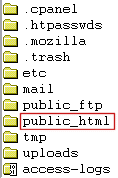
cPanel Web Server: File Structure Overview When you log in for FTP, your application will initially log you directly into the folder for 'username' because the login username that you used matched the folder name.. So, for example you will be put into the /home/username/ folder All files that you want to be shown on your website need to be uploaded into the /home/username/public_html/ folder, so you first need to navigate to that folder by double clicking on it.
After double clicking and changing to that directory you are likely to see something like this. --> This is the folder where ALL of your website HTML or PHP files that are for public display need to go.
